How to split a PDF and delete pages on Android
By Toolverse Labs, makers of PDF Tools · · 2 min read
Quick answer
To split a PDF on Android, open PDF Tools, go to Tools → Split, choose the PDF, tap the pages you want and tap Extract pages. To delete, reorder or rotate pages, use Tools → Organise.
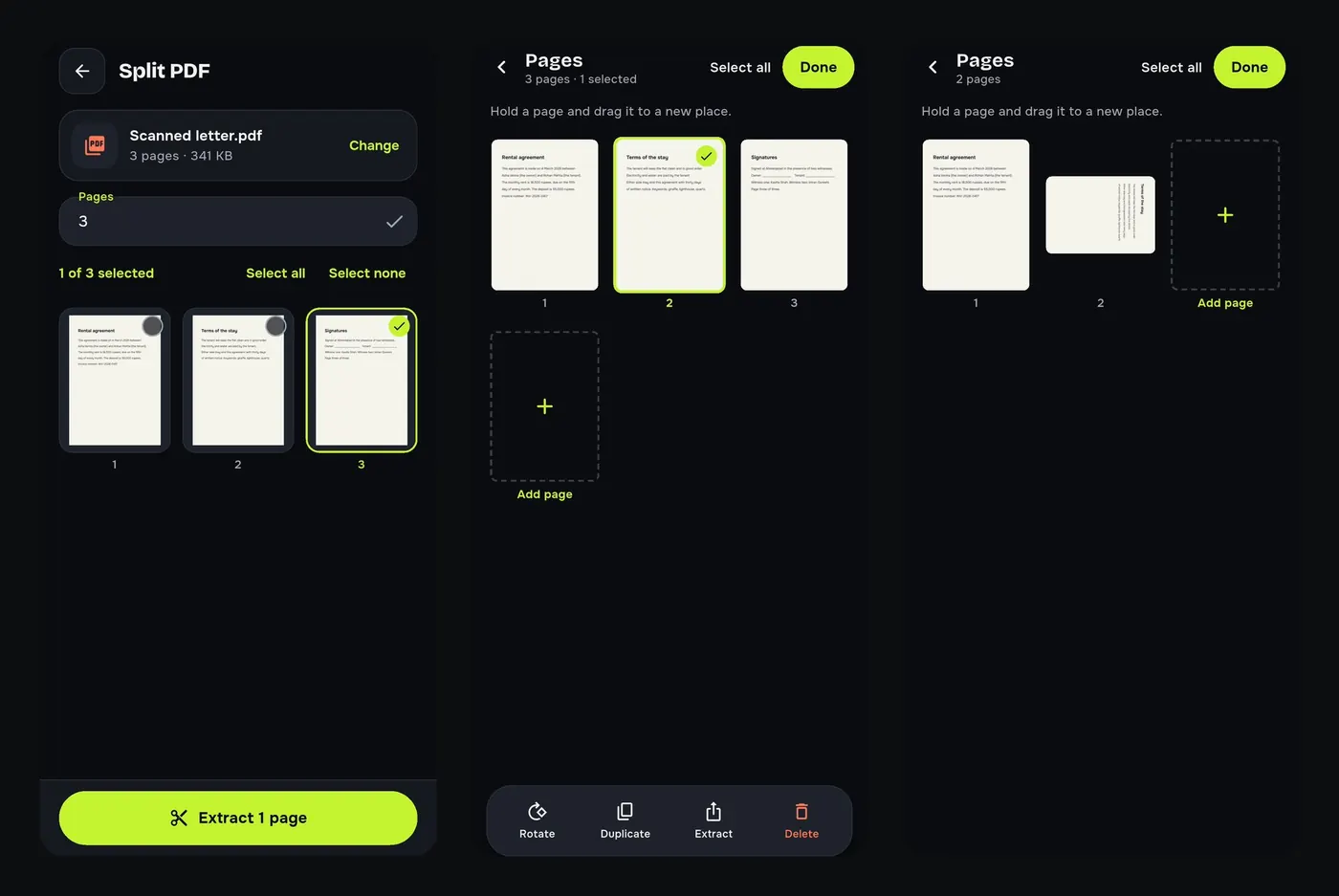
A 20-page bank statement when the office wants one page. A scan where page 2 came out upside down. A blank page in the middle of a report. These are page problems, and PDF Tools has two tools for them.
Split: extract pages from a PDF
- Go to Tools → Split and choose the PDF.
- Tap the pages you want, or type their numbers.
- Tap Extract pages. A new file is made; the original is unchanged.
Organise: delete, reorder and rotate pages
- Go to Tools → Organise and choose the PDF.
- Hold a page and drag it to a new place.
- Select pages to Rotate, Duplicate, Extract or Delete them. Tap Add page for a blank page.
- Tap Done to save the organised copy.
More page tools
- Crop: trim scanner borders and white margins.
- Resize pages: make every page A4, Letter, A5 or Legal.
- Pages per sheet: 2 or 4 pages on one sheet.
- Headers and page numbers and Watermark.
Try it on your phone. PDF Tools is free, works offline and needs no account.

Frequently asked questions
How do I remove one page from a PDF on my phone?
Open Tools, Organise, choose the PDF, select the page and tap Delete, then Done.
How do I save only one page of a PDF?
Use Split: tap that page and Extract pages.
Does splitting change the original PDF?
No. A new file is created.
Can I rotate just one page?
Yes. In Organise select that page and tap Rotate.
Everything PDF Tools can do
More than 40 tools in one free app, on phones and tablets, in 10 languages. Your files are processed on your phone and never uploaded to our servers.
- Edit: edit PDF text, find and replace, images, shapes, drawing, highlight, links, bookmarks, redact.
- Fill and sign: fill forms, saved details, make a form, sign, certificate signature, stamps and dates, flatten.
- Pages: organise, merge, split, rotate, crop, resize, pages per sheet, page numbers, watermark.
- Convert and scan: scan to PDF, images to PDF, ID card to PDF, OCR, QR scanner and maker, business card to contact, PDF to Word, Word to PDF, PDF to JPG, PDF to text, web page to PDF.
- Protect and shrink: compress PDF, compress photo, black and white, add or remove password, clean hidden data.
- Read, compare and find: reader with night mode, read aloud, translate, compare PDFs, find dates and amounts, print.
- Files and privacy: folders, favourites, recycle bin, app lock, search inside files, batch mode.
See every feature in detail or get PDF Tools on Google Play.
Related guides
How to merge PDF files on your Android phone
Combine two or more PDFs into one file on your Android phone, in the order you choose. Free, offline, no upload: ideal for single-file application forms.
PrintHow to print 2 or 4 pages per sheet from your phone
Save paper and money: put 2 or 4 PDF pages on one sheet, make a black and white copy and add page numbers on your Android phone before printing.
CompressHow to compress a PDF to 200 KB on your phone
Reduce a PDF to under 200 KB, 100 KB or any size limit for job, exam and government forms, right on your Android phone. Free, offline, no upload.