How to sign a PDF on your phone without printing it
By Toolverse Labs, makers of PDF Tools · · 2 min read
Quick answer
To sign a PDF on Android, open PDF Tools, tap Sign, choose the PDF, tap Signature, draw it with your finger or type it, tap Done, drag it into place and tap Save. No printer or scanner is needed.
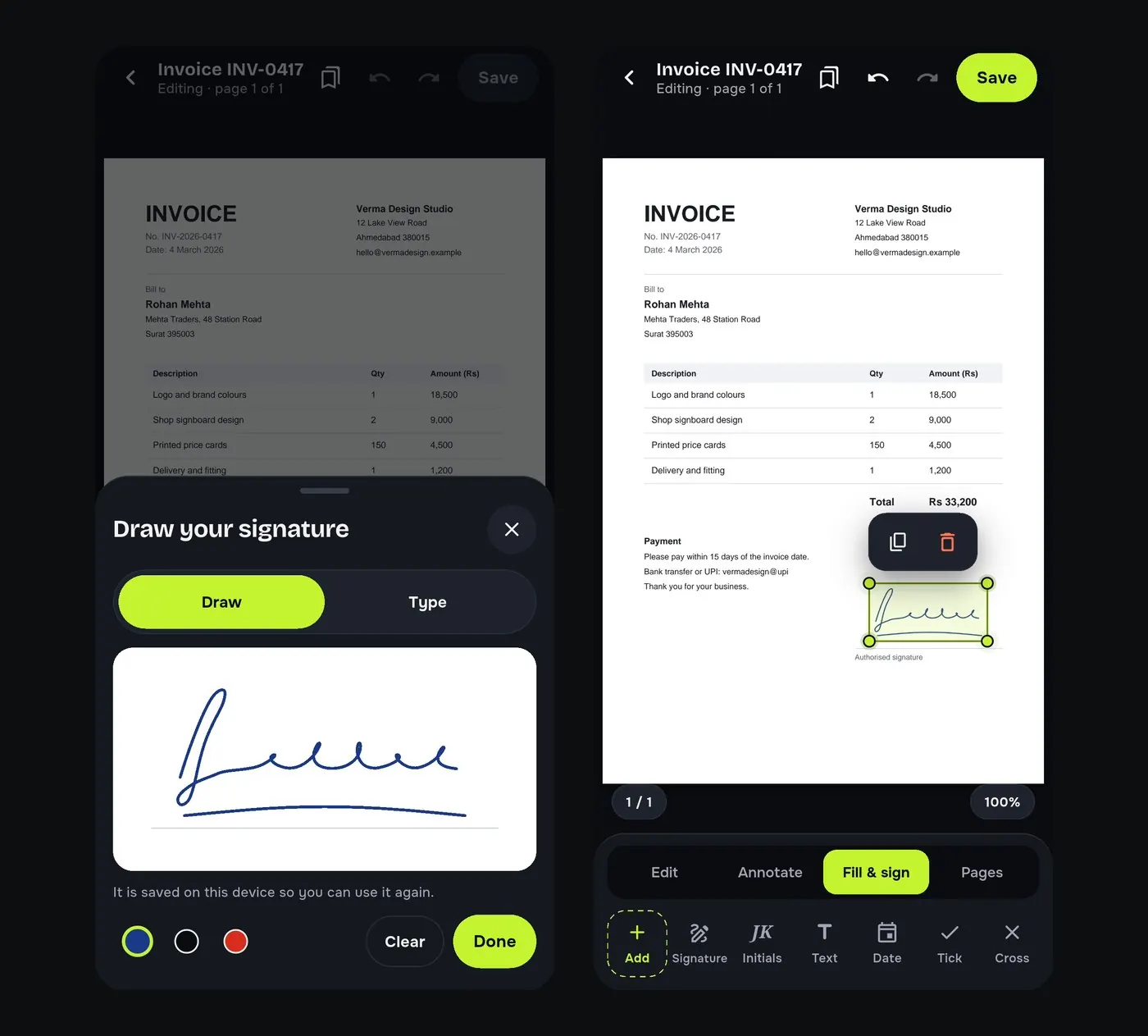
Print, sign, scan, send: four steps and often a trip to a shop, just to sign a rental agreement, an offer letter or an invoice. On your phone it takes a minute, and the signed PDF looks cleaner than a scan.
Steps to add your signature to a PDF
- Open PDF Tools and tap Sign under Quick tools.
- Choose the PDF. It opens on the Fill & sign tab.
- Tap Signature. Draw it with your finger, or switch to Type to type it. Pick the ink colour.
- Tap Done, drag the signature where it belongs and resize it.
- Tap Save, then Share the signed copy by WhatsApp or e-mail.
Initials, dates and ticks
Contracts often need initials on every page and the date next to the signature. On the same tab you will find Initials, Date, Tick, Cross and Text, so you can complete the whole document in one go.
Is a signature on a PDF legally valid?
A drawn signature is accepted for most everyday agreements, offer letters and forms, but rules differ by country and by document. When a document asks for a digital signature, PDF Tools can sign with your own certificate file (.pfx or .p12) from your company or a certifying authority. When in doubt, ask the person who sent you the document.
Good to know
- Your signature is saved on this phone only, so next time you place it with one tap.
- The original PDF stays as it was; the signed file is a new copy.
- Use Fill a form when the PDF has form fields.
Try it on your phone. PDF Tools is free, works offline and needs no account.

Frequently asked questions
How can I sign a PDF on my phone for free?
Open the PDF in PDF Tools, tap Sign, draw or type your signature and place it on the page. The app is free and adds no watermark.
Can I sign a PDF without printing it?
Yes. You sign on the screen and send the signed PDF, with no printer or scanner.
Is my signature uploaded anywhere?
No. It is stored only on your phone.
Can I add a digital certificate signature?
Yes, with your own .pfx or .p12 certificate file.
Everything PDF Tools can do
More than 40 tools in one free app, on phones and tablets, in 10 languages. Your files are processed on your phone and never uploaded to our servers.
- Edit: edit PDF text, find and replace, images, shapes, drawing, highlight, links, bookmarks, redact.
- Fill and sign: fill forms, saved details, make a form, sign, certificate signature, stamps and dates, flatten.
- Pages: organise, merge, split, rotate, crop, resize, pages per sheet, page numbers, watermark.
- Convert and scan: scan to PDF, images to PDF, ID card to PDF, OCR, QR scanner and maker, business card to contact, PDF to Word, Word to PDF, PDF to JPG, PDF to text, web page to PDF.
- Protect and shrink: compress PDF, compress photo, black and white, add or remove password, clean hidden data.
- Read, compare and find: reader with night mode, read aloud, translate, compare PDFs, find dates and amounts, print.
- Files and privacy: folders, favourites, recycle bin, app lock, search inside files, batch mode.
See every feature in detail or get PDF Tools on Google Play.
Related guides
How to fill a PDF form on your Android phone
Type into PDF form fields, tick checkboxes and pick options on your Android phone, then save, sign and send the form. Free and offline, no printing.
EditHow to add a watermark or a PAID stamp to a PDF
Stamp invoices as PAID, add a CONFIDENTIAL watermark to every page and highlight text in a PDF on your Android phone. Free, offline, your own logo too.
EditHow to edit the text of a PDF on your Android phone
Change words, dates and names inside a PDF on your Android phone. Retype a line or find and replace a word, free and offline, without a computer.