How to fill a PDF form on your Android phone
By Toolverse Labs, makers of PDF Tools · · 2 min read
Quick answer
To fill a PDF form on Android, open PDF Tools, go to Tools → Fill a form, choose the PDF, tap Next field and type, tick or choose for each field, then tap Save. For PDFs without fields, type anywhere on the page with the Text tool.
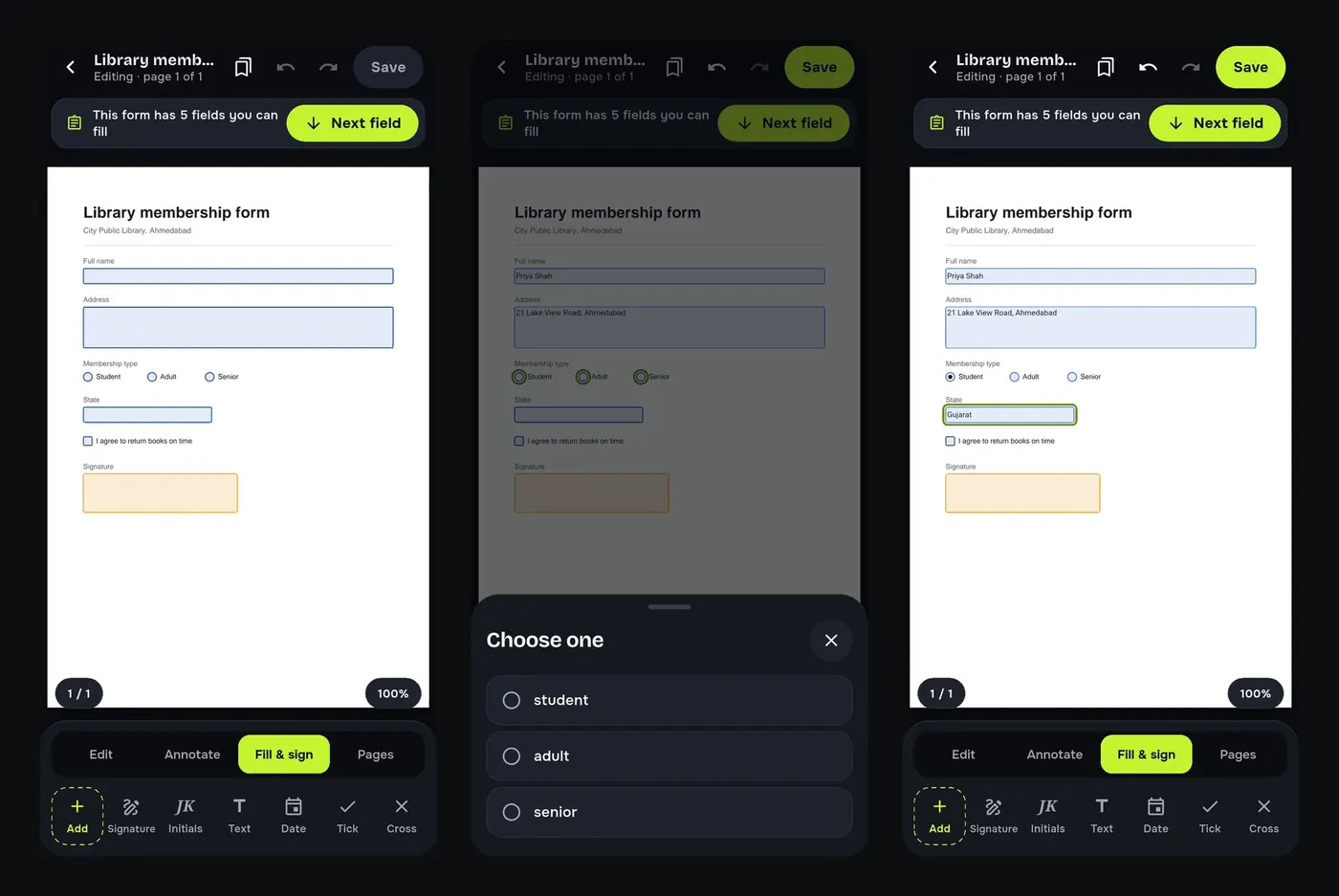
Admission, membership, KYC and application forms often come as fillable PDFs: they have real boxes for your name, checkboxes and drop-down lists. Many phone viewers ignore those fields, so people print the form, write on it and scan it back. PDF Tools fills them directly.
Steps to fill in a PDF form
- Go to Tools → Fill a form and choose the PDF.
- A bar tells you how many fields the form has. Tap Next field.
- Type in text fields, tap checkboxes, and pick options from lists.
- Tap Save, then sign, print or share the filled form.
When the PDF has no fillable fields
Many forms are just printed pages saved as PDF. On the Fill & sign tab use Text to type anywhere, and Tick, Cross and Date for boxes and dates. Then add your signature.
Save time on every form
- My details: save your name, phone and address once and fill forms with a tap.
- Flatten PDF: lock the answers so nobody can change them after you send the form.
- Make a form: add text fields, checkboxes and signature boxes to your own PDF.
Try it on your phone. PDF Tools is free, works offline and needs no account.

Frequently asked questions
How do I type on a PDF form on Android?
Use Fill a form for fillable fields, or the Text tool on the Fill & sign tab for any other PDF.
Can I fill and sign a PDF on my phone?
Yes. Fill the fields, then tap Signature on the same tab.
Can the receiver change my answers?
Flatten the PDF before sending so the answers become part of the page.
Does it work offline?
Yes. Filling forms needs no internet.
Everything PDF Tools can do
More than 40 tools in one free app, on phones and tablets, in 10 languages. Your files are processed on your phone and never uploaded to our servers.
- Edit: edit PDF text, find and replace, images, shapes, drawing, highlight, links, bookmarks, redact.
- Fill and sign: fill forms, saved details, make a form, sign, certificate signature, stamps and dates, flatten.
- Pages: organise, merge, split, rotate, crop, resize, pages per sheet, page numbers, watermark.
- Convert and scan: scan to PDF, images to PDF, ID card to PDF, OCR, QR scanner and maker, business card to contact, PDF to Word, Word to PDF, PDF to JPG, PDF to text, web page to PDF.
- Protect and shrink: compress PDF, compress photo, black and white, add or remove password, clean hidden data.
- Read, compare and find: reader with night mode, read aloud, translate, compare PDFs, find dates and amounts, print.
- Files and privacy: folders, favourites, recycle bin, app lock, search inside files, batch mode.
See every feature in detail or get PDF Tools on Google Play.
Related guides
How to sign a PDF on your phone without printing it
Add your signature to a PDF on your Android phone: draw or type it, place it on the page and share the signed file. Free and offline, no printer or scanner.
EditHow to edit the text of a PDF on your Android phone
Change words, dates and names inside a PDF on your Android phone. Retype a line or find and replace a word, free and offline, without a computer.
PagesHow to merge PDF files on your Android phone
Combine two or more PDFs into one file on your Android phone, in the order you choose. Free, offline, no upload: ideal for single-file application forms.