How to compare two PDF files and see what changed
By Toolverse Labs, makers of PDF Tools · · 2 min read
Quick answer
To compare two PDFs on Android, open PDF Tools, go to Tools → Compare PDFs, choose the older version as the First PDF and the newer one as the Second PDF, and tap Compare. Removed words are struck through in red and added words are green.
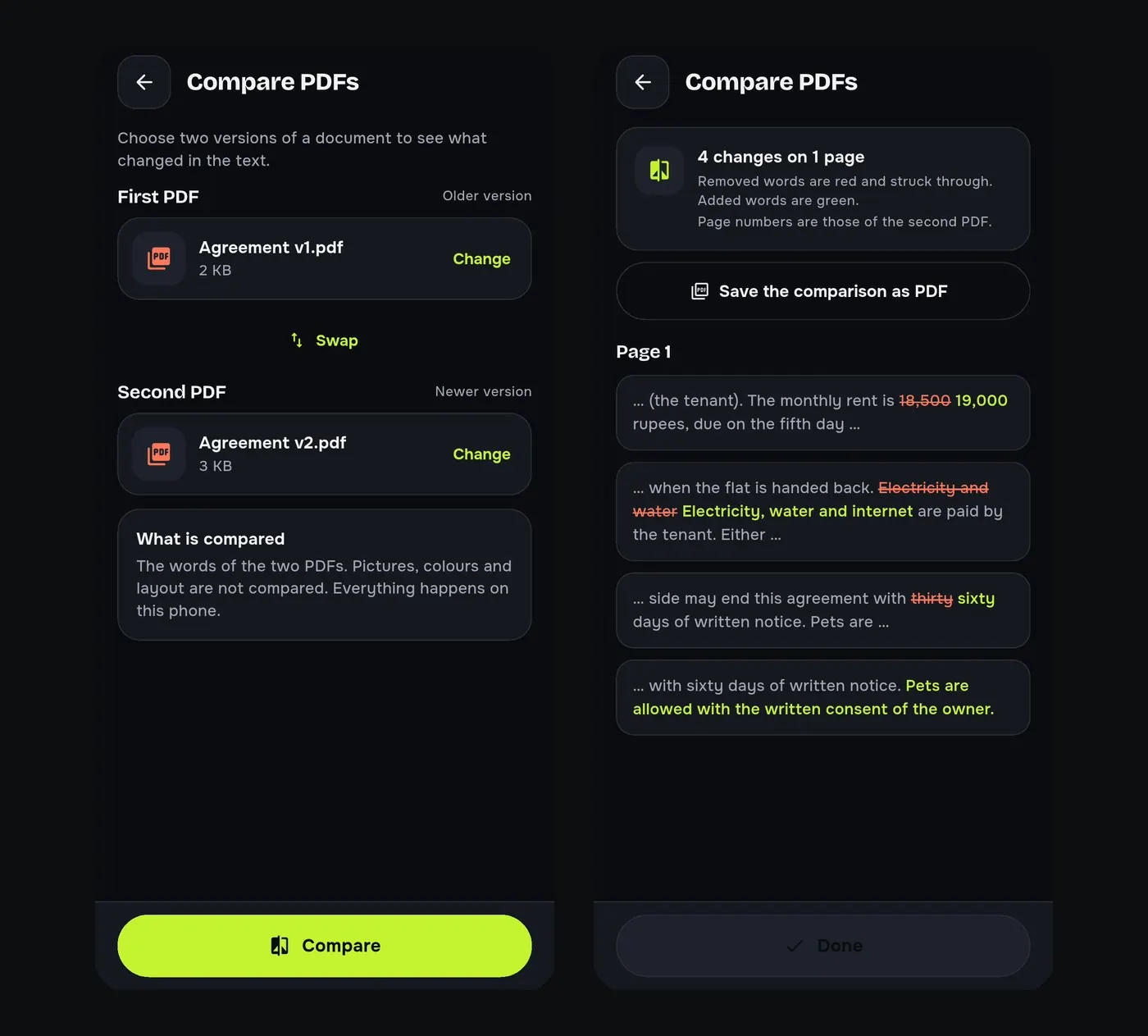
“Only small changes,” says the e-mail with the new agreement. Are they? Reading two versions side by side on a phone is close to impossible. PDF Tools compares them word by word.
Steps to compare two PDFs
- Go to Tools → Compare PDFs.
- Choose the First PDF (older) and the Second PDF (newer). Tap Swap if you mixed them up.
- Tap Compare.
- Read the summary, for example “4 changes on 1 page”, then each changed passage.
- Tap Save the comparison as PDF to keep a record or send it back.
What is compared
The words are compared. Pictures, colours and layout are not, so a moved logo or a new font does not count as a change, while a changed amount, date or clause does.
Where it helps
- Rental and employment agreements before you sign.
- Updated policies, price lists and quotations.
- Two drafts of an assignment or a report.
For scanned PDFs, run Make searchable first so there are words to compare.
Try it on your phone. PDF Tools is free, works offline and needs no account.

Frequently asked questions
How can I find the difference between two PDFs?
Use Compare PDFs in PDF Tools: pick both files and tap Compare.
Does it compare images?
No. It compares the words; pictures and layout are ignored.
Can I share the comparison?
Yes. Save the comparison as a PDF and share it.
Is it free?
Yes. Compare PDFs is free in PDF Tools.
Everything PDF Tools can do
More than 40 tools in one free app, on phones and tablets, in 10 languages. Your files are processed on your phone and never uploaded to our servers.
- Edit: edit PDF text, find and replace, images, shapes, drawing, highlight, links, bookmarks, redact.
- Fill and sign: fill forms, saved details, make a form, sign, certificate signature, stamps and dates, flatten.
- Pages: organise, merge, split, rotate, crop, resize, pages per sheet, page numbers, watermark.
- Convert and scan: scan to PDF, images to PDF, ID card to PDF, OCR, QR scanner and maker, business card to contact, PDF to Word, Word to PDF, PDF to JPG, PDF to text, web page to PDF.
- Protect and shrink: compress PDF, compress photo, black and white, add or remove password, clean hidden data.
- Read, compare and find: reader with night mode, read aloud, translate, compare PDFs, find dates and amounts, print.
- Files and privacy: folders, favourites, recycle bin, app lock, search inside files, batch mode.
See every feature in detail or get PDF Tools on Google Play.
Related guides
How to sign a PDF on your phone without printing it
Add your signature to a PDF on your Android phone: draw or type it, place it on the page and share the signed file. Free and offline, no printer or scanner.
ConvertHow to copy text from a scanned PDF with OCR on Android
Make a scanned PDF searchable and copy its text on your Android phone. Offline OCR for English, Hindi, Marathi and other Latin or Devanagari languages.
EditHow to edit the text of a PDF on your Android phone
Change words, dates and names inside a PDF on your Android phone. Retype a line or find and replace a word, free and offline, without a computer.